Event-driven automation without leaving the shop or writing code.
Whenever someone places an order, I want them to get a short thank-you email from me,
addressed with their first name.

Set that up as an automation inside the shop so it runs by itself from now on. Find out first
which triggers and actions this shop actually supports and which customer fields you can put in
the mail — then build it on the order trigger, switch it on, and read it back to confirm it exists
and is active.

Write the email itself as well: subject and body, warm but short, in the shop's language, with
the first name filled in dynamically. Show me the exact text you used.
Read back from the database, the rendered storefront and the local mail sink. No model involved.
| Result | Check | Weight |
|---|---|---|
| PASS | A workflow was created on a trigger matching order/bestellung created: #3956 orderPlaced → sendMail |
3 |
| PASS | That workflow is active isActive=1 |
2 |
| PASS | Its action is an e-mail action action=sendMail |
2 |
| PASS | Called describe_workflow_capabilities before creating describe at #0, create at #4 |
2 |
| PASS | The stored workflow arguments contain a first-name placeholder placeholder present in arguments |
2 |
Scored by opus, which saw only the evidence bundle.
| Criterion | Score | Reason | |
|---|---|---|---|
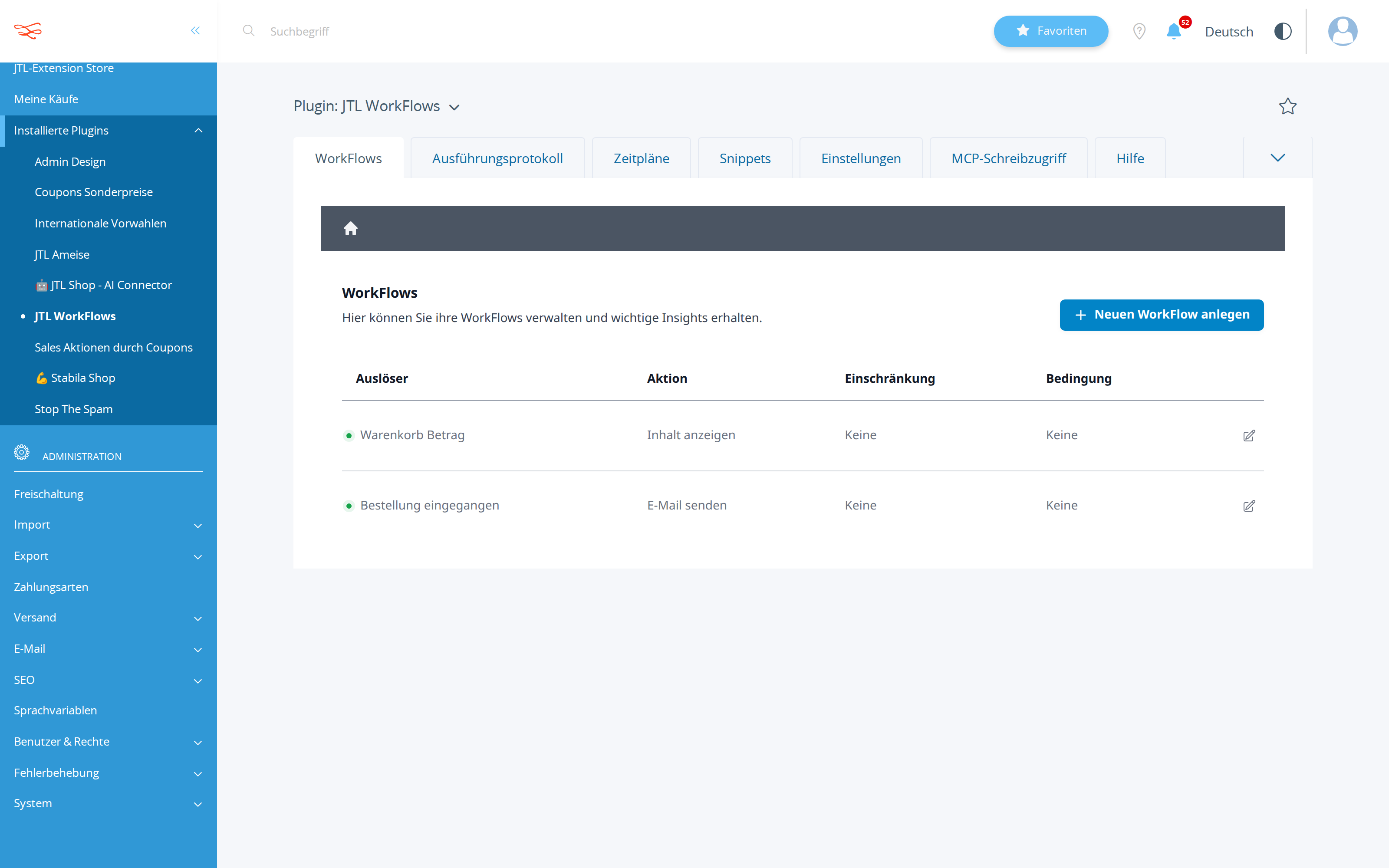
correctnessThe workflow is on the right trigger, sends mail, is active, and personalises with a real field name from this shop. |
9/10 | state_diff.json shows workflow 3956 orderPlaced→sendMail isActive=1 added, get_workflow read-back (call #7) and the admin screenshot both confirm 'Bestellung eingegangen → E-Mail senden' active, and personalisation uses {$customer->cVorname}/{$customer->cMail}, fields listed by describe_workflow_capabilities for this trigger. | |
methodCapabilities were discovered before building; the placeholder syntax matches what the shop documented. |
9/10 | describe_workflow_capabilities was called twice (generic catalogue at #1, then scoped to orderPlaced+sendMail at #3) before creating, list_workflows checked for conflicts, and a dryRun create (#5, valid:true, warnings:[]) preceded the real write — placeholder syntax {$customer->cVorname} matches the documented list exactly. | |
copy_qualityThe email text is short, warm, correct in the shop's language, and would not embarrass the owner. |
8/10 | Subject and body are correct, warm, formal-Sie German matching the shop language 'ger' from get_shop_info, with dynamic {$global->shopName} instead of a hardcoded name; only mild weakness is that four paragraphs is a touch longer than 'short' and it partly restates the standard order confirmation. | |
communicationThe exact subject and body are shown back to the owner. |
9/10 | ANSWER.md lines 27-41 print the exact subject and HTML body verbatim as stored, plus a rendered example for 'Anna Beispiel', the available customer/order fields, and two honest caveats (extra mail alongside the order confirmation, reply-to mailbox). |
It read the orderPlaced trigger description, noticed the shop documents that unknown placeholders render empty rather than erroring, and rejected completedCheckout because the order number is not yet guaranteed there — a correctness argument, not a guess.
The automation was never fired end-to-end (mail.json is empty and no tool exists to trigger it), so 'läuft scharf' rests on the fires:true marker and read-back rather than on a delivered message; the WORKLOG also cites two tool calls that the wire does not record.
| Tool | Calls | Errors | Avg |
|---|---|---|---|
describe_workflow_capabilities | 2 | 0 | 293 ms |
list_workflows | 2 | 0 | 279 ms |
create_workflow | 2 | 0 | 343 ms |
get_shop_info | 1 | 0 | 319 ms |
get_workflow | 1 | 0 | 345 ms |
describe_workflow_graph | 1 | 0 | 327 ms |
# Automatische Dankeschön-Mail nach jeder Bestellung — eingerichtet und aktiv

## Was jetzt läuft

Ab sofort bekommt jeder Besteller automatisch eine kurze Dankes-E-Mail, persönlich mit Vornamen.

| | |
|---|---|
| **Automation-ID** | 3956 |
| **Bezeichnung** | Danke-Mail nach Bestellung: sendet dem Besteller automatisch eine kurze, persönlich mit Vornamen adressierte Dankeschön-E-Mail |
| **Auslöser** | Bestellung eingegangen (`orderPlaced`) — greift erst, wenn die Bestellung wirklich gespeichert ist und eine Bestellnummer existiert |
| **Aktion** | E-Mail senden |
| **Status** | aktiv, läuft scharf (Ausführungs-Marker gesetzt) |
| **Ausführung** | asynchron — nach der Seitenauslieferung, die Bestellbestätigung im Shop wird also nicht verzögert |
| **Bedingung / Einschränkung** | keine — gilt für jede Bestellung |
| **Angelegt** | 11.08.2026 |
| **Tags** | crm, retention, thank-you |

Zusätzlich zur bestehenden Automation „Versandkostenfrei-Nudge" (ID 3955) laufen damit zwei aktive Automationen im Shop, beide ohne Fehler oder offene Verweise.

## Der Mailtext, genau so wie hinterlegt

**Empfänger:** `{$customer->cMail}`
**Empfängername:** `{$customer->cVorname} {$customer->cNachname}`
**Darstellung:** im Standard-E-Mail-Template des Shops (Kopf, Fuß und Layout bleiben also Ihr gewohntes Design)

**Betreff:**

```
Danke für Ihre Bestellung, {$customer->cVorname}!
```

**Inhalt:**

```html
<p>Hallo {$customer->cVorname},</p>
<p>vielen Dank für Ihre Bestellung {$order->cBestellNr} – wir freuen uns sehr, dass Sie bei uns eingekauft haben.</p>
<p>Ihre Bestellung ist bei uns eingegangen und wird jetzt bearbeitet. Sobald sie unterwegs ist, melden wir uns wieder bei Ihnen.</p>
<p>Wenn Sie Fragen haben, antworten Sie einfach auf diese E-Mail.</p>
<p>Herzliche Grüße<br>Ihr Team von {$global->shopName}</p>
```

So liest es ein Kunde namens Anna Beispiel bei Bestellnummer 12345:

> **Danke für Ihre Bestellung, Anna!**
>
> Hallo Anna,
>
> vielen Dank für Ihre Bestellung 12345 – wir freuen uns sehr, dass Sie bei uns eingekauft haben.
>
> Ihre Bestellung ist bei uns eingegangen und wird jetzt bearbeitet. Sobald sie unterwegs ist, melden wir uns wieder bei Ihnen.
>
> Wenn Sie Fragen haben, antworten Sie einfach auf diese E-Mail.
>
> Herzliche Grüße
> Ihr Team von JTL Shop - Development

## Welche Kundendaten in der Mail möglich sind

Der Auslöser „Bestellung eingegangen" stellt zwei vollständige Datenbereiche bereit, aus denen ich schöpfen kann:

- **Kundendaten:** Vorname, Nachname, Anrede (auch lokalisiert), Titel, Firma, komplette Anschrift, E-Mail, Telefon/Mobil, Kundennummer, Kundengruppe, Guthaben, Geburtstag, Newsletter-Status
- **Bestelldaten:** Bestellnummer, Gesamtsumme (auch in Kundenwährung und lokalisiert), Warensumme, Versandkosten, Steuern, Positionen, Zahlungsart- und Versandartname, Bestelldatum, Status, Tracking-Nummer und -URL, Rechnungs- und Lieferadresse, voraussichtliche Lieferzeit, Bestellstatus-URL
- **Shopdaten:** Shopname

Ich habe bewusst nur Vorname, Bestellnummer und Shopname verwendet — mehr braucht eine Danke-Mail nicht, und je weniger Felder, desto weniger kann bei einer ungewöhnlichen Bestellung leer bleiben.

## Was der Shop sonst noch kann (falls Sie ausbauen möchten)

**Weitere Auslöser, die sich anbieten:** Neue Kundenregistrierung (Willkommensmail), Checkout abgeschlossen, Kunde hat sich eingeloggt, Kundendaten geändert, Warenkorb-Betrag, Zeitplan (zeitgesteuert, z. B. nächtlich).

**Weitere Aktionen neben E-Mail:** Inhalt auf der Seite anzeigen, Log-Eintrag, URL aufrufen (Webhook), Weiterleitung, Seitentitel anpassen, Bereich verstecken, Artikel deaktivieren, HTTP-Header setzen, Versandarten CSV-Im-/Export, Gutscheinregel für Sonderpreise, PHP-Snippet ausführen sowie KI-Anfrage.

Eine Automation verbindet immer genau einen Auslöser mit genau einer Aktion. Wenn Sie z. B. zusätzlich eine Bewertungserinnerung oder eine Willkommensmail für Neuregistrierungen wollen, lege ich die als eigene Automation daneben.

## Zwei Hinweise

1. **Diese Mail kommt zusätzlich zur normalen Bestellbestätigung.** Wenn Ihnen zwei Mails direkt nacheinander zu viel sind, kann ich sie stattdessen zeitversetzt verschicken oder auf bestimmte Bestellungen begrenzen — sagen Sie einfach Bescheid.
2. **Antworten landen bei der Absenderadresse Ihres Shops**, da die Mail zur Antwort einlädt. Prüfen Sie, dass dieses Postfach auch gelesen wird.

## Prüfung

Ich habe die Automation nach dem Anlegen erneut aus dem Shop ausgelesen — nicht bloß die Rückmeldung des Speichervorgangs geglaubt. Bestätigt: ID 3956, Auslöser „Bestellung eingegangen", Aktion „E-Mail senden", aktiv, ausführungsbereit, Betreff und Text exakt wie oben. Die Gesamtprüfung aller Automationen meldet 2 Automationen, davon 2 aktiv, 0 Probleme.
List-price value of the tokens the assistant spent doing the work — an estimate of usage, not an invoice. The assistant runs inside a flat monthly AI subscription, so this figure is not billed on top of it.
Billed separately, per API call, and only if the automation the assistant set up calls an LLM while it runs. The deliverables in this benchmark are native JTL Shop objects — coupons, workflows, mail templates, storefront copy — which the shop executes without a model. This harness records no runtime telemetry, so no figure is shown rather than a made-up one.
Run 20260811-082757_e-thank-you-mail_opus · shop reset to fixture before the run · restore with jtl restore 20260811-082757_e-thank-you-mail_opus
© 2026 the author · scores are generated from recorded runs, not written by hand.